Tutorial kali ini menjelaskan beberapa perintah yang dapat Anda gunakan untuk mengelola bucket dan objek Amazon S3 menggunakan AWS CLI
Buat Bucket #
aws s3 mb <S3Uri>
Contoh
awsman@aws-cli:~$ aws s3 mb s3://mytopan
make_bucket: mytopan

awsman@aws-cli:~$ aws s3 ls
2023-01-08 14:48:35 mytopan
Copy S3 Object #
aws s3 cp <LocalPath> <S3Uri> or <S3Uri> <LocalPath> or <S3Uri> <S3Uri>
Contoh
copy isi folder local ke bucket #
awsman@aws-cli:~$ aws s3 cp --recursive public_html/ s3://mytopan/
upload: public_html/about/index.html to s3://mytopan/about/index.html
upload: public_html/assets/img/Aws-group.png to s3://mytopan/assets/img/Aws-group.png
upload: public_html/assets/img/Aws-home.png to s3://mytopan/assets/img/Aws-home.png
copy s3 object ke folder local #
awsman@aws-cli:~$ aws s3 cp --recursive s3://mytopan/ public-download/
download: s3://mytopan/404.html to public-download/404.html
download: s3://mytopan/about/index.html to public-download/about/index.html
download: s3://mytopan/archives/index.html to public-download/archives/index.html
copy s3 object ke bucket lain #
awsman@aws-cli:~$ aws s3 cp --recursive s3://mytopan/ s3://mytopan-backup/
copy: s3://mytopan/404.html to s3://mytopan-backup/404.html
copy: s3://mytopan/archives/index.html to s3://mytopan-backup/archives/index.html
copy: s3://mytopan/about/index.html to s3://mytopan-backup/about/index.html
Move S3 Object #
aws s3 mv <LocalPath> <S3Uri> or <S3Uri> <LocalPath> or <S3Uri> <S3Uri>
Contoh
move isi folder local ke bucket #
awsman@aws-cli:~$ aws s3 mv --recursive public-download/ s3://mytopan/
move: public-download/archives/index.html to s3://mytopan/archives/index.html
move: public-download/404.html to s3://mytopan/404.html
rename s3 object #
awsman@aws-cli:~$ aws s3 mv s3://mytopan/nanonugget.txt s3://mytopan/nugget.txt
move: s3://mytopan/nanonugget.txt to s3://mytopan/nugget.txt
Remove S3 Object #
aws s3 rm <S3Uri>
Contoh
awsman@aws-cli:~$ aws s3 rm --recursive  s3://mytopan/
delete: s3://mytopan/404.html
delete: s3://mytopan/about/index.html
delete: s3://mytopan/archives/index.html
Sync S3 Object #
aws s3 sync <LocalPath> <S3Uri> or <S3Uri> <LocalPath> or <S3Uri> <S3Uri>
Contoh
sync folder local ke bucket #
awsman@aws-cli:~$ aws s3 sync public_html/ s3://mytopan/
upload: public_html/404.html to s3://mytopan/404.html
sync s3 object ke folder local #
awsman@aws-cli:~$ aws s3 sync s3://mytopan/ public_html/
download: s3://mytopan/404.html to public_html/404.html
download: s3://mytopan/about/index.html to public_html/about/index.html
sync s3 object ke bucket lain #
awsman@aws-cli:~$ aws s3 sync s3://mytopan s3://mytopan-backup/
copy: s3://mytopan/404.html to s3://mytopan-backup/404.html
copy: s3://mytopan/archives/index.html to s3://mytopan-backup/archives/index.html
Remove Bucket #
aws s3 rb <S3Uri>
Contoh
awsman@aws-cli:~$ aws s3 rb s3://mytopan
remove_bucket: mytopan
Tambahkan option force apabila di bucket masih terdapat object
awsman@aws-cli:~$ aws s3 rb --force s3://mytopan/
delete: s3://mytopan/404.html
delete: s3://mytopan/about/index.html
remove_bucket: mytopan
Generate URL S3 Object #
aws s3 presign <S3Uri>
Contoh
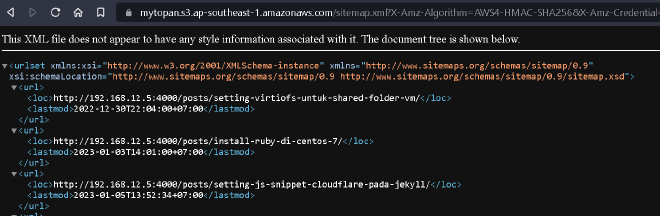
awsman@aws-cli:~$ aws s3 presign s3://mytopan/sitemap.xml --expires-in 30
https://mytopan.s3.ap-southeast-1.amazonaws.com/sitemap.xml?X-Amz-Algorithm=AWS4-HMAC-SHA256&X-Amz-Credential=AKIAW66Z2DXXUHKAMGO6%2F20230109%2Fap-southeast-1%2Fs3%2Faws4_request&X-Amz-Date=20230109T074811Z&X-Amz-Expires=30&X-Amz-SignedHeaders=host&X-Amz-Signature=b6a143780a5e4c7932c71884f3e01146f84c4e0b158bd268332467d2b7c1208e
Jika option expires-in tidak ditentukan maka nilainya akan 3600 atau 1 Jam
Test akses dengan browser