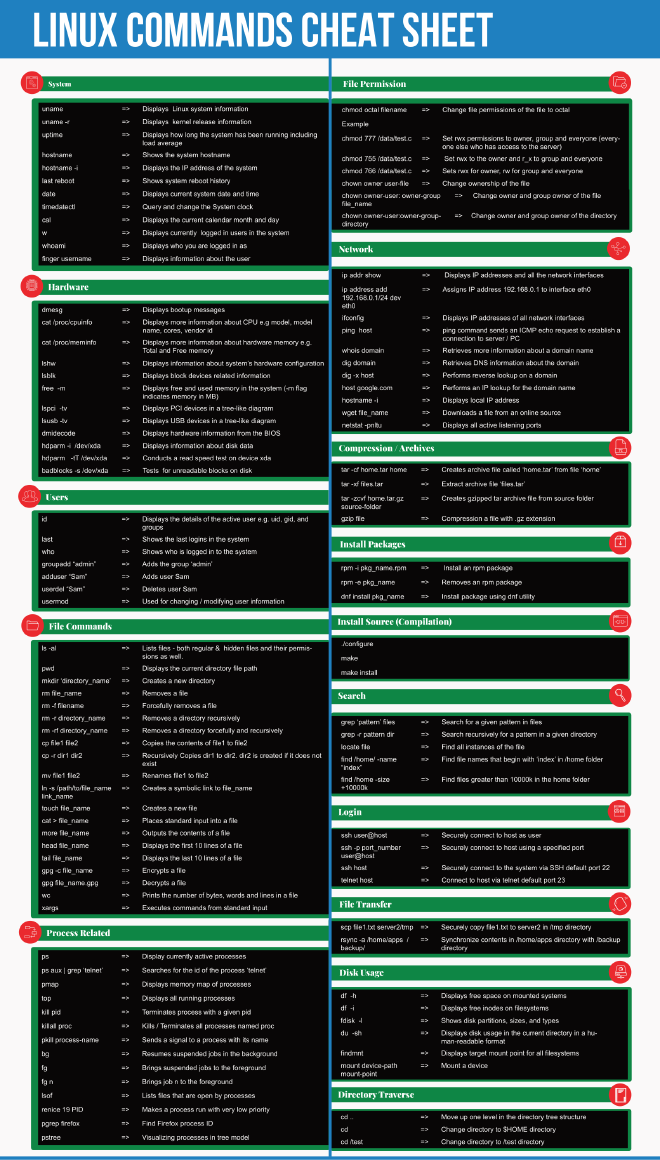
Berikut merupakan Cheat Sheet untuk perintah linux yang paling umum digunakan berdasarkan kategori dan dapat digunakan sebagai referensi baik untuk pengguna dasar atau berpengalaman.
Menghapus package di Ubuntu
apt-get --purge -y remove mysql-server mysql-client mysql-common mysql-server-core-* mysql-client-core-*
Untuk membuat user
useradd -m user -d /home/user
Anda juga bisa menentukan shell pada user yang dibuat.
useradd -m user -s /sbin/nologin -d /home/user
Untuk menghapus user
userdel -rfRPZ user
Untuk melihat proses yang memakan CPU paling banyak.
ps H -eo pid,pcpu | sort -nk2 | tail
$ ps H -eo pid,pcpu | sort -nk2 | tail
31396  0.6
31396  0.6
31396  0.6
31396  0.6
31396  0.6
31396  0.6
31396  0.6
31396  0.6
30904  1.0
30914  1.0
Dari output tersebut, diketahui pemakaian CPU paling banyak ada pada PID 31396.
Untuk mengetahui service berdasarkan PID.
ps aux | fgrep 30914
Atau bisa juga dengan perintah.
ll /proc/30914
Untuk mengecek status koneksi pada port tertentu.
netstat -nap | fgrep 80
Atau bisa juga dengan perintah.
lsof -i :80
Untuk melihat jumlah thread.
ps -eLf | wc -l
Untuk menemukan file log besar.
find / -name '*log*' -size +1000M -exec du -h {} \;
Metode kedua.
du -a / | sort -rn | grep log | more
Metode ketiga.
find / -type f -name "*log*" | xargs ls -lSh | more
Monitoring disk IO
iotop -o
Untuk menemukan file berdasarkan tanggal tertentu.
Syntax.
find /dir/ -type f -newerXY 'yyyy-mm-dd' -ls
Huruf X dan Y dapat berupa salah satu dari huruf berikut:
- a – The access time of the file reference
- B – The birth time of the file reference
- c – The inode status change time of reference
- m – The modification time of the file reference
- t – reference is interpreted directly as a time
Contoh penggunaannya.
find / -type f -newerat '2024-07-07' ! -newerat '2024-07-08' -ls
Atau bisa juga seperti berikut.
find /path/to/directory -type f -newermt "Oct 13" ! -newermt "Oct 13 +1 day"