WebVirtCloud adalah virtualization web interface yang dapat digunakan untuk mengelola VM pada hypervisor KVM dan sebagai alternatif dari virt-manager karena memiliki fitur yang hampir mirip dan memiliki interface yang mudah dipahami.
Quick Install with Installer #
Jalankan perintah berikut sebagai root
wget https://raw.githubusercontent.com/retspen/webvirtcloud/master/install.sh
chmod 744 install.sh
./install.sh
Manual Installation #
Install package dependencies.
apt-get -y install git virtualenv python3-virtualenv python3-dev python3-lxml libvirt-dev zlib1g-dev libxslt1-dev nginx supervisor libsasl2-modules gcc pkg-config python3-guestfs libsasl2-dev libldap2-dev libssl-dev
Clone webvirtcloud dari repo github.
git clone https://github.com/retspen/webvirtcloud /srv/webvirtcloud
Generate secret key dengan script berikut.
import secrets
generated_key = secrets.token_urlsafe(50)
print(''.join(generated_key))

### Use for old python versions < 3.6
##import random
##import string
#
##haystack = string.ascii_letters + string.digits + string.punctuation
##print(''.join([random.SystemRandom().choice(haystack.replace('/', '').replace('\'', '').replace('\"', '')) for _ in range(50)]))
Tambahkan secret key pada file webvirtcloud/settings.py.
cd /srv/webvirtcloud
cp webvirtcloud/settings.py.template webvirtcloud/settings.py
nano webvirtcloud/settings.py
SECRET_KEY = "R)l+e3kl5+fk98#~[I7K2H.rST^k"Hpt}>J@f#$SbsA},4e3{*"
Salin konfigurasi nginx dan supervisor
cp conf/supervisor/webvirtcloud.conf /etc/supervisor/conf.d/
cp conf/nginx/webvirtcloud.conf /etc/nginx/conf.d
Build webvirtcloud
virtualenv -p python3 venv
source venv/bin/activate
pip install -r conf/requirements.txt
python3 manage.py migrate
python3 manage.py collectstatic --noinput
rm /etc/nginx/sites-enabled/default
chown -R nginx:nginx /srv/webvirtcloud
Restart service nginx dan supervisor
systemctl restart nginx supervisor
Setup KVM dan libvirt.
wget -O - https://bit.ly/36baWUu | sh
Test akses webvirtcloud melalui http://IP pada browser Anda.
Default credentials.
login: admin
password: admin
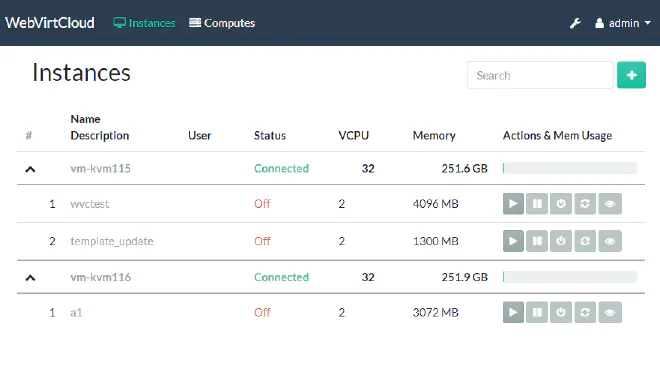
How To Update #
Untuk update webvirtcloud.
cd /srv/webvirtcloud
source venv/bin/activate
git pull
pip3 install -U -r conf/requirements.txt
python3 manage.py migrate
python3 manage.py collectstatic --noinput
systemctl restart nginx supervisor